

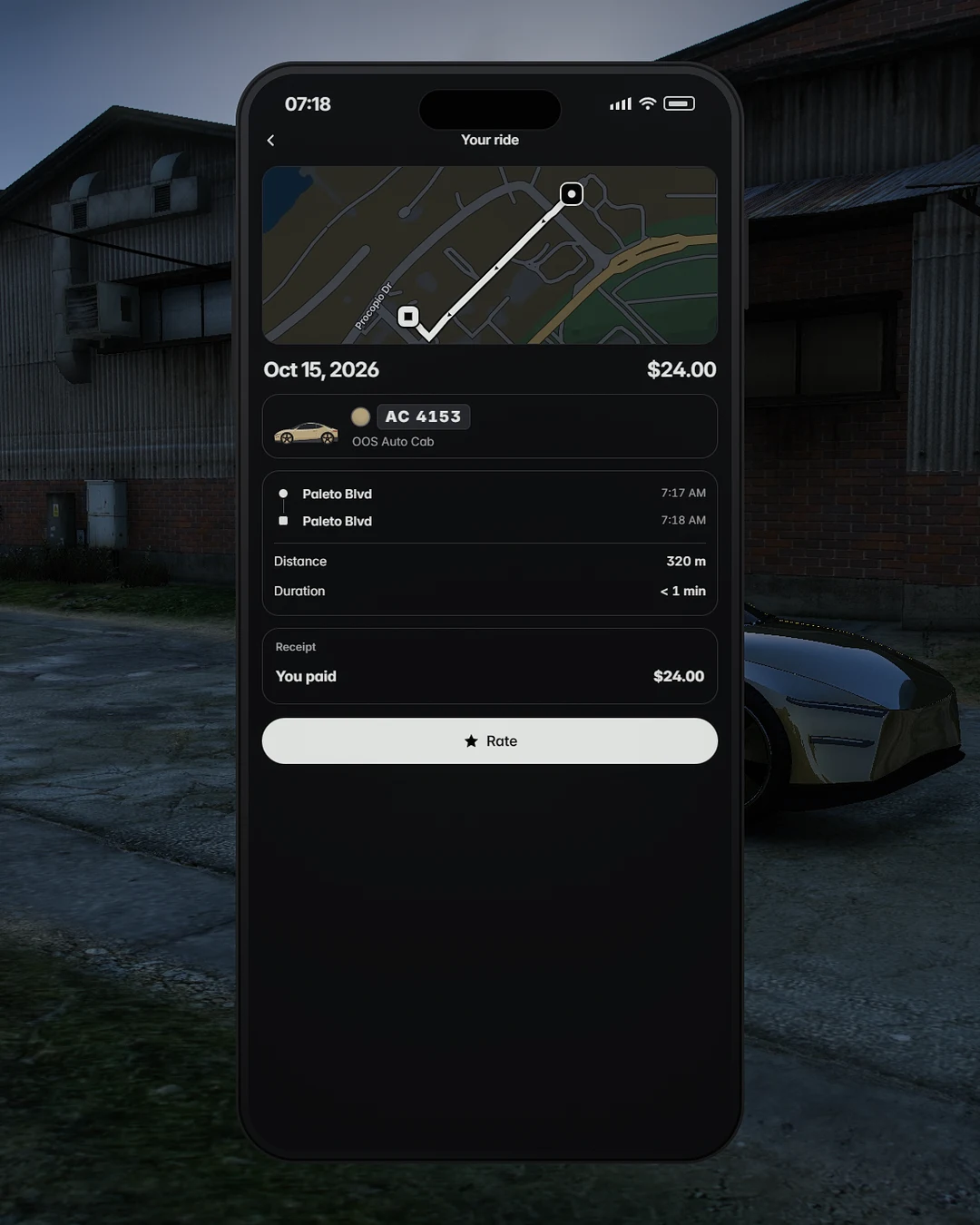
A receipt for every ride.
Route on a map, distance, duration, times and the fare's path.
OOS Auto Cab adds driverless cabs to OOS Ride. A rider books one from the rider side of the app, watches it come, steps in through a door that opens by itself and rides to their destination. Nobody is at the wheel, and nobody has to be.
It is an add-on. It needs OOS Ride, and OOS Ride runs exactly as before without it. Install the add-on and the service appears in the app on its own.
It drives itself, like a good taxi driver.
It stops for traffic and for people, steers round a parked car and pulls in at the kerb the way a taxi would.
Around that sits everything a paid service needs: an upfront fare, a receipt, refunds by rule, one admin page and a fleet you control.
Booking
The same app, one more service.
 Ride
Ride XL
XL Black
BlackIn the rider app the Auto Cab sits beside Ride, XL and Black, with its fare, the short walk to the pickup and the arrival time shown before you book. Tap Book and the app shows "Finding your Auto Cab" at once. You have an arrival time straight away, and the cab on your map and minimap as it comes into the world. Not sure which car is yours? Find my cab flashes the hazards and chirps the horn.
Pickup
Hazards on, in at the kerb, beside you.
Near the stop it pulls in to the kerb at a spot measured for it. When it arrives on the rider's side it stops beside them. When it arrives on the far side of a street it stops on its own side, and the rider crosses, as with any taxi. From the far carriageway of a divided road it comes round to the rider's side. It indicates into the kerb and away from it, and when the kerb is lined with parked cars it stops beside them with its hazards on.
Doors
Nobody touches a handle.
As the rider walks up, or when the cab pulls up near where they wait, the door on their side swings slowly open, and it closes by itself once they are seated. Getting out, it opens by itself and closes once they have stepped clear. Nobody opens or closes a door by hand, on either side of the car. A door opens only for the people on the booking, and never while the car is moving.
Screen
It already knows your name.
A screen is painted onto the car's own display, behind its glass. It greets the rider by name and runs the boarding checklist. Once the ride starts it shows the live map in the app's navigation view, and a 3D scene of the car in its own paint with the traffic and the people around it, out to 70 metres (230 feet). At the end it shows which side to step out on. Light by day and dark at night, or fixed, as you choose.
You can changeThe live screen, the car's own screen or none, its colours, and whether it shows the traffic.
Controls
Everything a passenger would say to a driver, as a button.
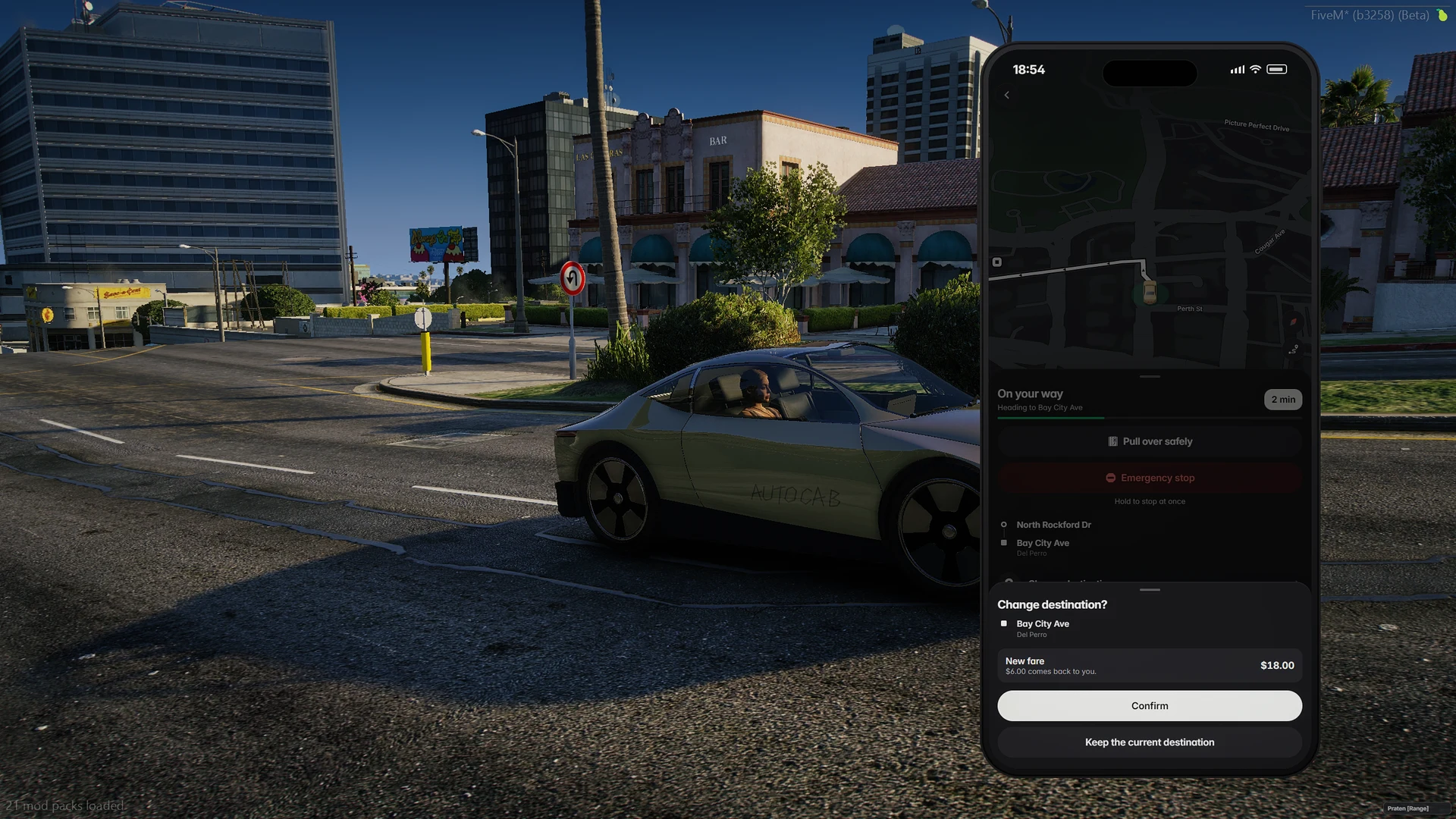
Try the emergency stop. Press and hold.
Hold for about a second and a half.
Depending on what is wrong it unsticks the car, reroutes it, calms the driving, brings the cab closer to the rider, opens a door, asks the rider out, resets the screen or swaps the car for another one out of everybody's sight, and it tells the rider what it found and did. A topic that could not do anything in the current phase is not offered.
Driving
Three paces, and you pick one.
The cab goes straight to the stop. It stops for traffic and for people, stops at red lights, steers round a parked car and gets out of a tight spot, and the rest of the traffic stops for it as it would for a player's car. You choose one of three driving styles for the whole service.
Within about 90 metres (300 feet) of the stop, every style slows to a taxi's 40 km/h (25 mph). The speed of each class of road is a setting.
Appearing
A car that was never there, and then is.
A cab appears out of everybody's sight, well away from its rider, and then drives to them through the streets like any other car. Nobody ever sees one pop into the road. After a ride it waits for the rider to step clear, shuts its doors, drives away and is removed only once nobody can see it go. A cab that is still driving off takes the next booking nearby, so no new car has to appear at all.
Fares
The fare, the arrival time and the progress bar are the same route.
The fare is quoted before the ride, from the route the cab will drive, and that same route measures progress. A detour, a missed turn or a recovery manoeuvre never makes an early exit cost more: a partial charge can only be lowered by how the car drove, never raised. If the car cannot carry on, that is the service's failure and the rider is charged accordingly.
Money is charged once and refunded by rule, and a refund owed to a character who was offline is paid when they come back. Every ride ends with a receipt: the priced route, the distance, the duration and the times.
Seats
Two passenger seats and nothing else a player can reach.
The cab has two passenger seats, no driver's seat and not even a steering wheel. There is simply nothing to take over. The second seat goes only to a guest the rider invites and who accepts.
Running the fleet
The cab is an unusual vehicle, so it is built to get along with the scripts that notice it.
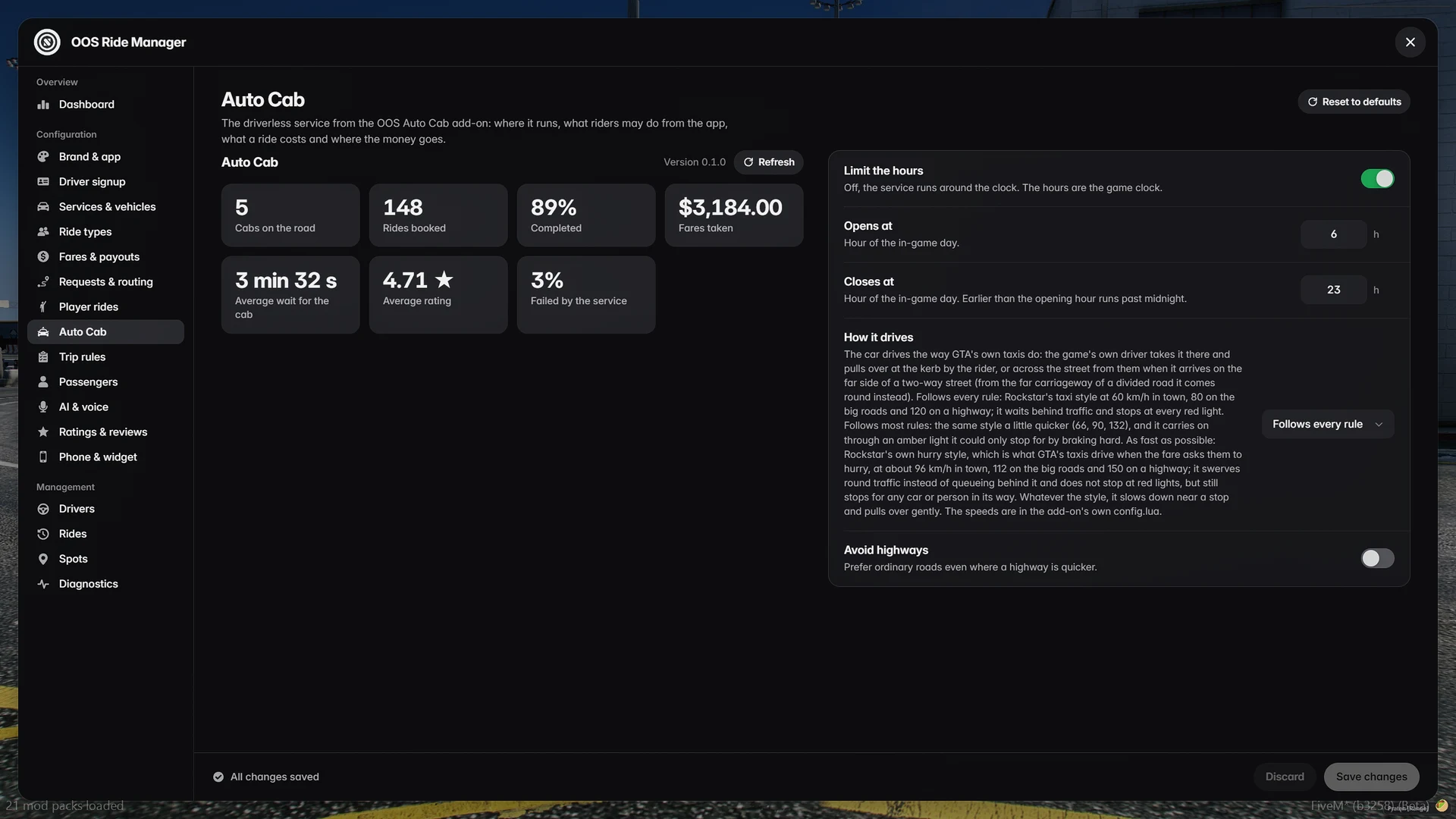
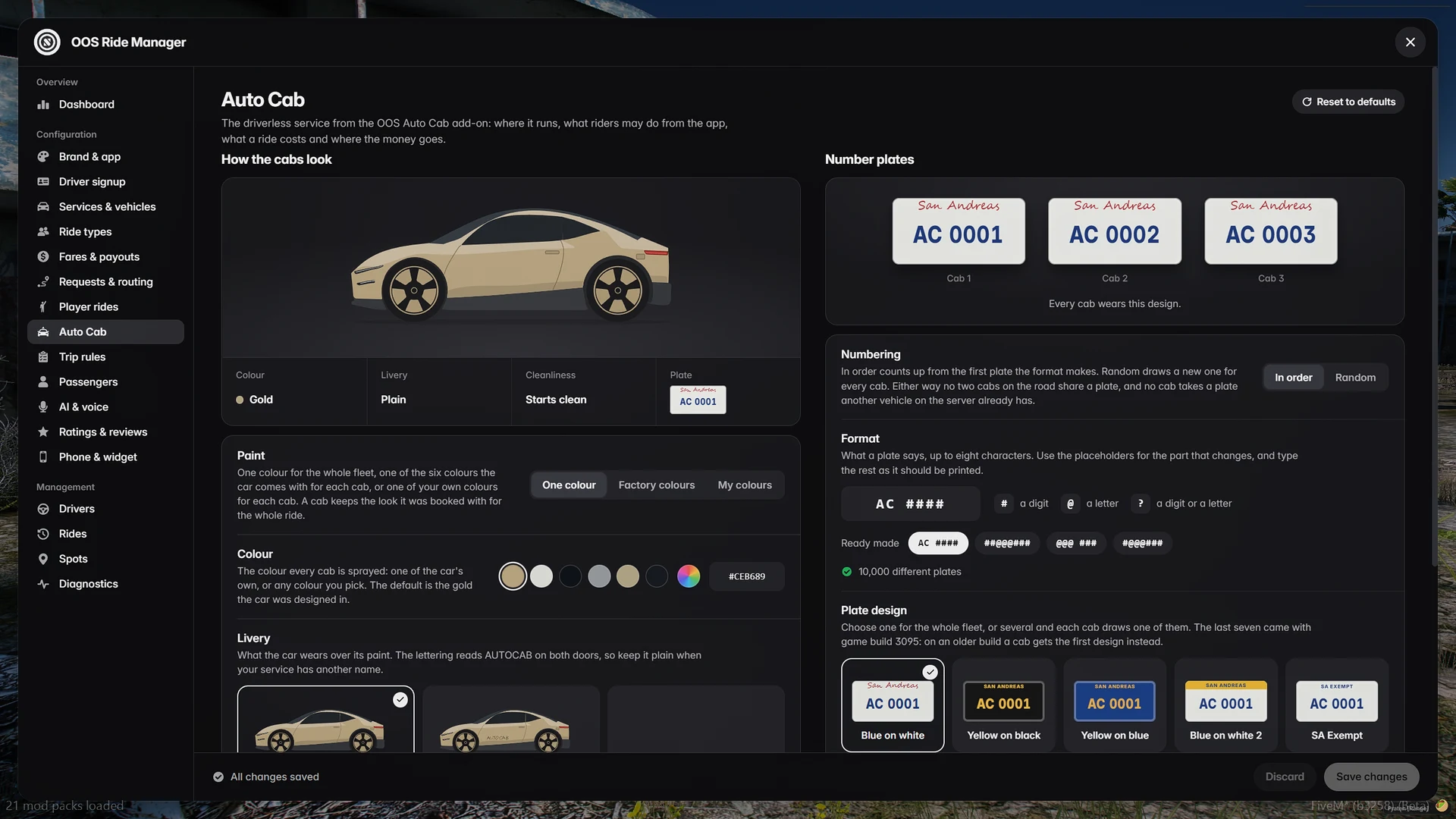
All on the Auto Cab page of the admin panel.
A palette of your own, drawn per cab, and plates in your own format.
Tap a position to switch it: 9 is a digit, A a letter, ? either.
Three cabs drawn at random from your palette and your plate format. Plates can also be numbered in order, on any of the game's thirteen plate designs.
Route on a map, distance, duration, times and the fare's path.
The cab stands by with the door open instead of driving off.
Every notice a rider gets comes through your server's notification resource.
Thirteen of the game's designs. Seven of them need game build 3095 or later, and the admin page marks them on an older build.
With no cab known to a player's game, the add-on asks the game almost nothing.
The dashboard of the admin panel shows the add-on's status.
Two things, and the first is the one that matters: the Auto Cab is an add-on for OOS Ride.
| Requirement | Notes |
|---|---|
| OOS Ride | It finds the add-on by itself and shows its status on its dashboard |
| FXServer with OneSync | The cab is created by the server |
Yes. It is an add-on, and OOS Ride detects it automatically. OOS Ride works exactly as before without it.
No. There is no driver's seat and no steering wheel to take, and a player who did not book the cab finds the door shut.
Only if you want it to. You can offer the Auto Cab only when no human driver is nearby.
Like a taxi, in one of three styles you choose: by every rule, by most rules, or as fast as possible.
Yes. Service name, vehicle name, accent colour, paint, livery, plates and every line of text.
Nowhere, to a society account, or to an event of your own. Charges happen once and refunds follow a rule.
It reverses and re-routes. If it cannot continue, it pulls over, unlocks and ends the ride fairly, and the rider is not charged for the service's failure.
Yes. The radio works as in any car in the game, and there is a boot for luggage.
Yes. The cab only ever appears where nobody can see it, so in a crowd it can take a little longer to arrive.
OOS Auto Cab
A taxi with nobody at the wheel.
Support and licences at oos-scripts.com.
Needed for the Auto Cab
OOS Ride: rideshare where the passenger talks back.
A complete rideshare job for FiveM. Artificial intelligence (AI/SI) passengers you talk to out loud, rides ordered by real players, a real map in the app and one admin panel for everything.
See OOS Ride
Connect your Discord account to automatically claim your Customer Role, get priority support, and access exclusive server giveaways!
